
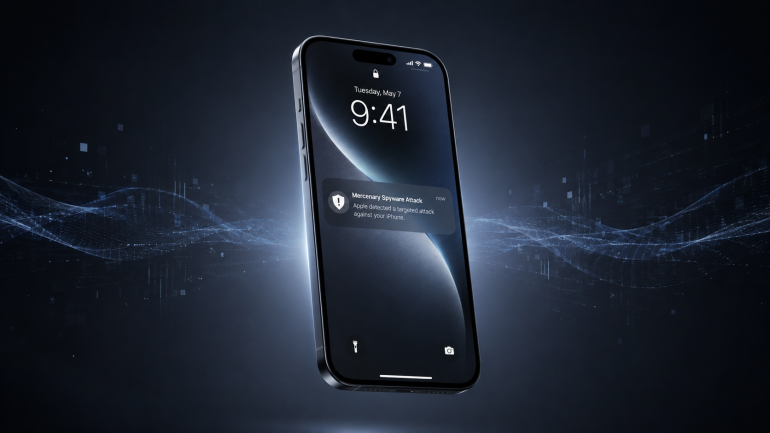
An Apple security notification appearing on your iPhone’s Lock Screen is normally the sort of thing you might expect to deal with later. If it says Apple has detected a mercenary spyware attack targeting your iPhone, however, it deserves your immediate attention.
Apple has changed how it warns people it believes have been individually targeted by some of the most sophisticated spyware in circulation. The company’s updated threat notification guidance says alerts can now appear directly on the iPhone Lock Screen, alongside the email, iMessage and Apple Account warnings it already used. Apple describes these as high-confidence alerts that someone has been individually targeted.
According to TechCrunch, Apple sent a new round of notifications on 13 August 2026 to users targeted in 110 countries. The company hasn’t disclosed how many people received them or which countries were included, so there’s currently no basis for saying South African users were part of this specific batch. Apple says it has sent threat notifications to users in more than 150 countries since introducing the system in 2021.
The change makes the warning harder to miss, but the more useful thing to understand is what Apple has to believe before it sends one.
This isn’t a normal malware warning
Most of the cybersecurity threats an ordinary smartphone owner encounters are designed to scale. Phishing messages are sent to thousands of people. Stolen usernames and passwords are traded in bulk, often for surprisingly little on criminal marketplaces. Mercenary spyware operates at almost the opposite end of the economics of cybercrime. Apple says these attacks can cost millions of dollars and use considerable resources against a very small number of carefully selected people.
The targets are often journalists, politicians, activists and diplomats, although belonging to one of those groups doesn’t automatically mean you’re being watched. Apple says the attacks have historically been associated with state actors and private companies developing mercenary spyware on their behalf.
Pegasus, developed by Israel’s NSO Group, is probably the best-known example, but it isn’t the only one. Commercial surveillance companies have continued developing tools capable of compromising phones in ways that sometimes require almost nothing from the person being targeted. Apple itself names Pegasus from NSO Group as an example of mercenary spyware.
That changes the usual cybersecurity equation. Much of the advice people have absorbed assumes that eventually someone has to make a mistake: click the strange link, install the suspicious file or hand over a password. With zero-click exploits, even careful security habits may not prevent the initial compromise.
Citizen Lab has documented attacks in which devices were compromised without the victim opening a malicious link or knowingly interacting with the attacker. In 2025, researchers confirmed that two European journalists had been hacked with Paragon’s Graphite spyware. One of them, an unnamed prominent European journalist, was compromised through what Citizen Lab described as a sophisticated zero-click attack delivered via iMessage. Italian journalist Ciro Pellegrino was also found to have evidence linked to the same Paragon operator on his device.
An Apple threat notification therefore isn’t the company telling you that you might have clicked something dangerous. It’s telling you that its threat intelligence has detected activity sufficiently unusual and targeted for Apple to believe you may have been selected for a mercenary spyware attack.
A warning doesn’t necessarily mean the attack succeeded
Receiving the notification doesn’t prove that spyware successfully infected your iPhone. Apple deliberately doesn’t reveal the exact evidence that causes it to issue an alert because doing so could help spyware developers change their behaviour and avoid detection, and the company acknowledges that its investigations can’t establish absolute certainty.
That uncertainty shouldn’t be read as Apple sending speculative warnings. The company describes the alerts as high confidence, and subsequent investigations have repeatedly shown that they can be valuable starting points for uncovering real surveillance campaigns.
A Citizen Lab investigation published on 3 July 2026 provides a particularly clear example. Former Member of the European Parliament Stelios Kouloglou had received Apple mercenary spyware threat notifications on 2 March 2023, 29 August 2023 and 10 April 2024. When he contacted Citizen Lab in May 2026, forensic analysis found with high confidence that his iPhone had been successfully infected with NSO Group’s Pegasus spyware on or around 21 October 2022 and again on 6 and 7 March 2023. Kouloglou had been serving on the European Parliament committee investigating the use of Pegasus and similar surveillance spyware during the infection periods.
The dates also show why the notifications shouldn’t be treated as real-time alerts. Citizen Lab says Apple and other companies typically send them in batches, sometimes months or more after the targeting took place. In Kouloglou’s case, the first Apple notification came months after the October 2022 infection, while another arrived years after the infections Citizen Lab was able to confirm.
That timing means the correct response isn’t simply to avoid using your phone for the next hour and assume the danger has passed. The alert should be treated as evidence of targeted activity that may need proper investigation.
First, make sure the Apple alert is real
There is an obvious problem with making security notifications more prominent: scammers know people panic when they’re told they’ve been hacked.
Apple says its threat notifications will never ask you to click a link, open a file, install an app or configuration profile, or provide your Apple Account password or verification code. If you receive a warning and aren’t sure whether it’s legitimate, don’t rely on the message itself. Go directly to account.apple.com and sign in. A genuine Apple threat notification will appear at the top of your account page.
That verification step is particularly important because a fake spyware alert would be an effective phishing lure. Someone being told that an expensive, highly targeted surveillance tool may be aimed at them is more likely than usual to react quickly, which is exactly what a phishing attempt would try to exploit.
Then turn on Lockdown Mode
If the notification is genuine, Apple recommends enabling Lockdown Mode. Lockdown Mode is available to South African users and is designed specifically for people who may be facing unusually sophisticated digital attacks. It deliberately reduces some functionality in order to shrink the number of possible routes an attacker can use against the device.
Among its protections, Lockdown Mode restricts some message attachments and web technologies, limits certain incoming communications and prevents configuration profiles from being installed while the mode is active. The restrictions can make the device less convenient to use, but that inconvenience is part of the design because reducing functionality can also reduce attack surface.
There is unusually strong evidence that the trade-off works. On 27 March 2026, Apple spokesperson Sarah O’Rourke told TechCrunch that the company wasn’t aware of any successful mercenary spyware attack against a Lockdown Mode-enabled Apple device. Amnesty International Security Lab head Donncha Ó Cearbhaill told the publication that his team had likewise seen no evidence of an iPhone being successfully compromised by mercenary spyware while Lockdown Mode was enabled at the time of the attack. Citizen Lab has also publicly documented cases in which Lockdown Mode blocked spyware attacks involving Pegasus and Predator.
None of that proves the protection is impossible to defeat, but it is much stronger evidence than a vague promise that a security feature simply makes a device “more secure”.
On an iPhone, you can switch it on under Settings > Privacy & Security > Lockdown Mode, then choose Turn On Lockdown Mode and restart the device. Apple recommends enabling it across your other supported Apple devices as well.
Don’t try to investigate this on your own
Apple also recommends that anybody who receives a genuine threat notification seek specialist help. Forensic investigation of mercenary spyware is very different from running antivirus software and looking for a suspicious app because some of these tools are designed specifically to minimise the traces they leave behind.
Apple points recipients towards specialist digital security assistance, while organisations including Citizen Lab and Amnesty International’s Security Lab have played central roles in analysing devices and uncovering spyware campaigns after victims received platform warnings. Apple’s guidance also stresses that the vast majority of users will never be targeted by attacks of this kind.
There is a broader reason not to dismiss an alert simply because your phone appears to be functioning normally. Citizen Lab senior researcher John Scott-Railton told TechCrunch that Apple’s notifications can prompt individual recipients to seek help, which can in turn expose much wider campaigns. He pointed to investigations into spyware abuse in Poland as an example of how platform alerts can become the first visible sign of a larger surveillance operation.
For most iPhone owners, none of this should create a new reason to be anxious. Apple stresses that the overwhelming majority of users will never be targeted with mercenary spyware. Keeping devices updated, using two-factor authentication and maintaining good account security remain far more relevant to everyday users.
Apple’s mercenary spyware warnings are useful precisely because they’re unusual. If one appears on your Lock Screen, verify it through your Apple Account, enable Lockdown Mode and get specialist help rather than assuming it is another generic security notification. The alert doesn’t prove your iPhone has been compromised, but Apple has detected enough targeted activity to believe you may be the intended target of an unusually sophisticated attack.