
I don’t think there’s ever been a point where I’ve felt like I have too much storage. Between photos, videos, documents, review files and everything else that accumulates on my laptop, I’m constantly reminded of how quickly even a reasonably generous amount of storage can disappear. And while cloud storage has made managing files easier, there are still plenty of occasions when I’d rather have everything stored locally, especially when I’m travelling or working with large video files.
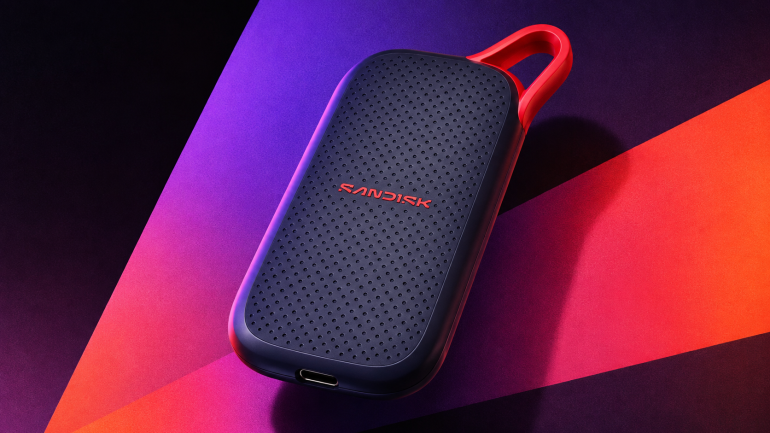
That’s where something like the Sandisk Portable SSD V3 comes in. It’s a small external drive that connects over USB-C, promises read speeds of up to 1,000MB/s and is designed to make carrying additional storage considerably easier than it used to be. The 500GB version I’ve been using is the smallest in the range, with 1TB and 2TB options available for anyone who needs more space.
On paper, it’s a fairly appealing product. There’s a compact design, drop protection and a three-year limited warranty, while the USB-C connection means it should work with everything from laptops to compatible tablets and smartphones. Sandisk also claims it’s up to five times faster than conventional portable hard drives, which is quite a selling point if you’re upgrading from one of those older devices. Sandisk
Unfortunately, my experience with the V3 hasn’t been nearly as straightforward as I’d expected. I tested it using my M5 MacBook Air, and despite trying five different USB-C cables and both ports on the laptop, the drive repeatedly connected at USB 2.0 speeds. That meant the performance I recorded was nowhere near what Sandisk advertises, and after spending quite some time trying to work out what was happening, I’m still not entirely sure what’s causing it.
Small enough to take almost anywhere
One thing I appreciate about portable SSDs is how small they’ve become. I remember when external storage meant carrying around a chunky hard drive, sometimes with its own power supply, and the whole arrangement wasn’t exactly convenient if you were moving between meetings or travelling with a laptop.
The Sandisk V3 is a very different proposition. It’s compact enough to slip into a pocket or a small compartment in a laptop bag, and the black enclosure has a simple design that doesn’t try to make the drive look more elaborate than it needs to be. There’s a USB-C connection and an integrated loop for attaching it to a bag with a suitable clip or carabiner.
It’s the sort of accessory I appreciate because it doesn’t add much bulk to what I’m already carrying. I travel with enough technology as it is, and the last thing I need is another sizeable accessory taking up space in my bag.
Sandisk also says the V3 can survive drops of up to two metres, which is reassuring for something designed to be carried around. That claim comes from the company’s internal testing, so I wouldn’t treat it as an invitation to throw the drive around, but it’s good to know there’s some protection against an accidental fall. Sandisk
There isn’t an advertised IP rating for dust and water resistance, though, which is something you get with Sandisk’s more expensive Extreme Portable SSD. I don’t think everyone needs that additional protection, especially if the drive is mainly going to be used at a desk or kept inside a laptop bag, but it’s worth considering if you regularly work outdoors.
Sandisk promises 1,000MB/s. I got nowhere close.
This is where things became frustrating.
The V3 uses USB 3.2 Gen 2, which supports connections of up to 10Gbps. Sandisk advertises sequential read speeds of up to 1,000MB/s, an improvement over the 800MB/s claim of the previous generation. The company doesn’t publish a corresponding write-speed figure for the 500GB model, although it does acknowledge that writes are slower. Sandisk+1
To find out how the drive performs, I connected it to my M5 MacBook Air and ran Blackmagic Disk Speed Test, which measures how quickly a drive can read and write data. It’s a fairly straightforward way to test storage performance, and I was interested to see how close the Sandisk could get to its advertised speeds.
The initial results were disappointing. Blackmagic recorded a write speed of 43.1MB/s and a read speed of 39.5MB/s, which is considerably slower than I’d expect from a modern portable SSD.
I initially suspected the USB-C cable, so I swapped it out for another one, this time using a cable rated for 100Gbps. The write speed increased to 165MB/s in the second test, although the read speed remained almost unchanged at 39.4MB/s.
Sandisk Portable SSD V3 500GB: My benchmark results
| Blackmagic test | Write | Read |
| First run | 43.1 MB/s | 39.5 MB/s |
| Second run | 165.0 MB/s | 39.4 MB/s |
| Sandisk claim | Not stated | Up to 1,000 MB/s |
Tested using an Apple M5 MacBook Air. The readings are recorded results, not confirmed maximum performance of the SSD.
The second write result was also difficult to explain because the Mac subsequently reported the drive connecting at USB 2.0 speeds, which wouldn’t normally allow transfers anywhere near 165MB/s. I wouldn’t treat that particular reading as a reliable sustained-write result without further testing under a confirmed high-speed connection.
What concerned me more was the consistently low read performance. At around 39MB/s, I was getting roughly 4% of the speed Sandisk advertises, and that’s an enormous difference for a product whose main selling point is being able to move files quickly.
Five cables later, I still couldn’t get a faster connection
Initially, I thought the problem was simply the cable. USB-C is convenient because the same connector can be used for so many different devices, but the cables themselves don’t all support the same speeds. Some are designed primarily for charging and only support USB 2.0 data transfers, while others are capable of considerably faster connections.
I tried five different USB-C cables in total, including the 100Gbps cable, and checked the connection using macOS System Information. I also tried both USB-C ports on the MacBook Air, connecting the drive directly rather than through a hub or dock.
Every time I checked, macOS reported the Sandisk connecting at 480Mb/s, which is the maximum theoretical connection speed of USB 2.0. That’s very different from the 10Gbps connection the V3 is supposed to support, and it helps explain why my read speeds were hovering around 39MB/s.
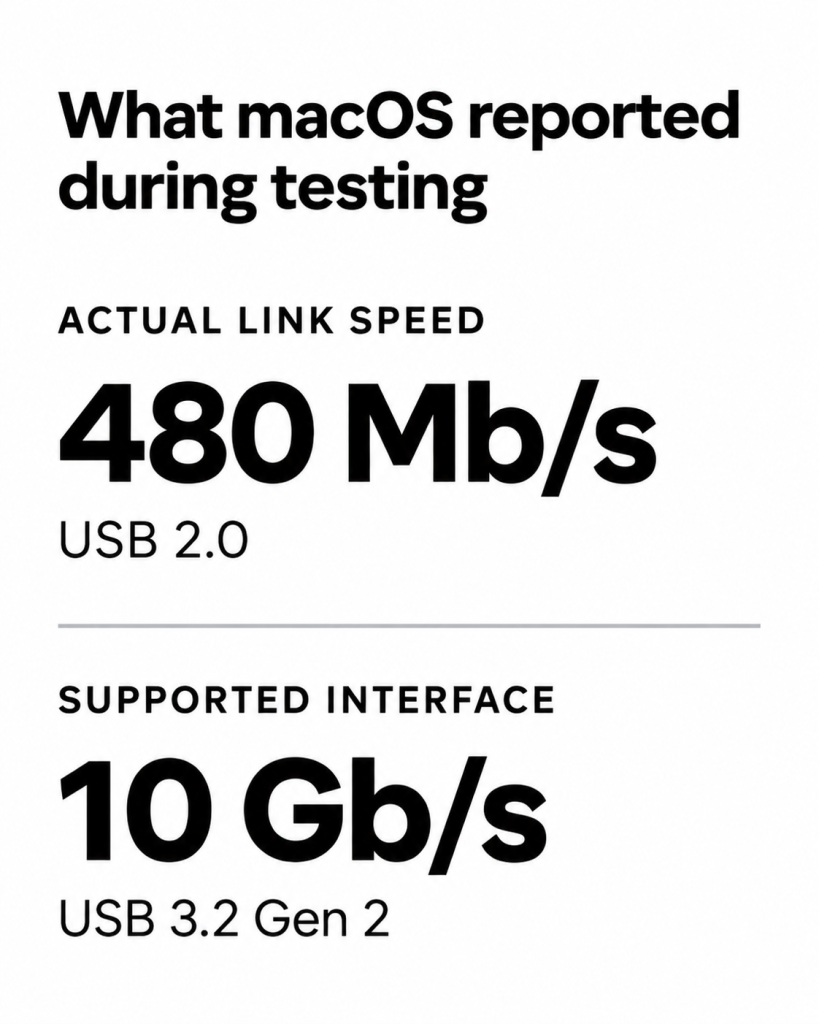
I also checked the drive’s formatting and available storage. It was formatted as exFAT, which allows it to be used across Macs and Windows PCs, and it was essentially empty, with almost the entire 500GB capacity available. Neither of those things explains why the connection itself was negotiating at USB 2.0 speeds.
After trying five cables and both ports, I wasn’t especially keen on repeating the same tests indefinitely. At some point, an external SSD should just work, and I don’t think it’s unreasonable to expect that when you’re spending more than R2,000 on one.
There are still a few possible explanations. There could be a problem with the SSD’s USB-C connector or controller, a compatibility issue between the drive and my Mac, or something else preventing the connection from operating at its intended speed. I haven’t been able to isolate the cause, and without confirming how this particular drive performs on another computer, I can’t say that it’s defective.
I also can’t conclude that every Sandisk V3 will behave the same way. What I can say is that my review unit consistently connected at USB 2.0 speeds during testing, and I wasn’t able to get the performance Sandisk advertises, despite trying multiple cables and both available ports.
That’s disappointing, because the drive is supposed to offer a relatively simple way of getting fast external storage without having to worry about complicated setup requirements.
USB-C should make things easier
Putting the performance problem aside, the V3’s compatibility is one of the reasons I was interested in it.
Sandisk lists support for Windows 10 and newer, macOS 13 and newer, iPadOS 15 and newer, and Android 13 and newer. That makes it suitable, at least on paper, for moving files between a fairly wide range of devices without having to use cloud storage. Sandisk
I use several devices across different ecosystems, and there’s something convenient about having a physical drive that can move between them. If I’m travelling with a laptop and taking photographs or recording videos on my phone, I’d much rather have the option of copying everything onto an SSD than having to upload large files over hotel Wi-Fi.
It’s much the same when you’re working with a tablet. Devices like Samsung’s Galaxy Tab S12 Ultra are increasingly being positioned as alternatives to laptops, and being able to access large files without filling their internal storage can make a difference, especially when you’re working with photographs and video.
Of course, compatibility isn’t quite as simple as having a USB-C port. The format used by the drive is important, and there are differences in how macOS, Windows, Android and iPadOS handle external storage. In my case, the Sandisk arrived formatted as exFAT, which is useful for moving files between Macs and Windows PCs without having to reformat it.
I appreciate not having to install a separate app or create an account to access my files. The V3 is designed to work like a conventional external drive, and that’s exactly how I think something like this should behave. Unfortunately, the slow connection speeds I encountered made the experience considerably less appealing than it should have been.
Is 500GB actually enough?
This is something I’d think carefully about before buying the V3 because, while 500GB sounds like a reasonable amount of storage, it doesn’t necessarily go very far these days.
If you’re mainly keeping documents, PDFs, photographs and occasional videos, I think the 500GB model makes sense. It’s also useful as a secondary drive for files you don’t need sitting on your laptop all the time, especially if you bought a MacBook with 256GB or 512GB of internal storage.
But if you’re regularly working with video, I’d probably consider something bigger. Modern smartphones can shoot some impressive 4K footage, and those files take up a huge amount of space. Add several projects, original footage and exported videos, and it’s easy to see how 500GB could disappear quite quickly.
The same applies to photography, especially if you’re working with RAW files rather than JPEGs. Even if you’re reasonably organised about deleting things you no longer need, storage requirements tend to grow, and buying a drive that’s already close to your needs doesn’t leave much room for anything else.
Sandisk offers the V3 in 1TB and 2TB capacities, and I’d be inclined to look at the 1TB version if the price difference isn’t too steep. I don’t think everyone needs 2TB of portable storage, but having a bit more room than you currently need is something I’ve rarely regretted.
I’d also avoid relying on any portable SSD as the only place where important files are stored. External drives can fail, get lost or suffer damage, and having another backup is always a good idea. Given the connection problems I experienced with this particular unit, I’d be even more cautious about using it as my only backup until the issue has been properly investigated.
What does it cost in South Africa?
The Sandisk Portable SSD V3 500GB is available through several South African retailers, although the price varies quite a bit.
At the time of checking, GeeWiz listed it for R2,304, while FirstShop had it at R2,499. Techcel Shop listed the same model for R2,269, so it’s worth comparing prices before deciding where to buy.
At around R2,300, the 500GB V3 isn’t necessarily a bad deal if it performs as advertised, although I’d still compare it with other portable SSDs before buying. Samsung’s T7 is one alternative I’d look at, along with Sandisk’s own Extreme range, especially if you’re planning to use the drive regularly for large file transfers.
My experience makes the price a little harder to justify, though. If I’m spending this much on an SSD that’s advertised as being substantially faster than a conventional portable hard drive, I expect to see a meaningful improvement in performance, and that simply hasn’t been the case with the unit I’ve been testing.
The V3 comes with a three-year limited warranty, which offers some reassurance if there turns out to be a hardware problem. I haven’t established whether my review unit qualifies for a warranty claim, but it’s something I’d investigate before continuing to rely on it for important files.
Verdict: I like the idea, but my experience has been disappointing
There are things I like about the Sandisk Portable SSD V3. It’s small, easy to carry and uses a connection that’s now common across most of the devices I work with. The claimed two-metre drop protection is welcome, and I can see the appeal of having an additional 500GB of storage without carrying around a bulky hard drive.
But I can’t overlook what happened during testing. Sandisk advertises read speeds of up to 1,000MB/s, yet the best read speed I recorded was 39.5MB/s. Five different USB-C cables and both ports on my M5 MacBook Air didn’t resolve the problem, and macOS repeatedly showed the drive connecting at 480Mb/s rather than the 10Gbps supported by its USB 3.2 Gen 2 interface.
I don’t know whether there’s something wrong with this particular unit or whether there’s a compatibility problem that needs to be addressed. Without identifying the cause, it wouldn’t be fair to suggest that the V3 is inherently this slow, but it also wouldn’t be right to ignore the results simply because they fall so far below what Sandisk promises.
The lack of a published write-speed figure doesn’t help, either. It’s difficult enough to judge how an SSD will handle large transfers without having to work out why it isn’t connecting at the correct speed in the first place.
For now, I’m reluctant to recommend the 500GB V3 based on my experience. There’s a good product here on paper, and I suspect someone who gets the advertised performance would have a very different experience, but that’s not what happened during my testing.
At more than R2,000, I expect an external SSD to deliver more than a compact design and a convenient connection. I expect it to be fast, reliable and easy to use, and until I can establish why my review unit is performing the way it is, those are promises I can’t say it’s delivered on.
Testing note: The Sandisk Portable SSD V3 500GB was tested on an Apple M5 MacBook Air using Blackmagic Disk Speed Test. Five USB-C cables and both MacBook Air USB-C ports were tried. macOS consistently reported a 480Mb/s connection. The cause has not been confirmed, and these results should not be interpreted as representative benchmark speeds for all V3 units. No separate real-world sustained file-transfer benchmark or durability test was completed.